AI + LLM Dashboards
Slide Contents
Putting LLMs in Shiny apps
Three patterns, increasing complexity:
- Chat interface: a conversational UI (
shinychat) - Tool calling: let the LLM take actions in your app
- Data chat: query your dataframe with natural language (
querychat)
shinychat
shinychat provides a ready-made chat UI component for Shiny:
from shiny.express import ui
from shinychat import chat_ui, chat_server
from chatlas import ChatGithub

ui.page_opts(title="My Chatbot")

chat_ui("chat")

@chat_server("chat")
def _():
return ChatGithub(model="gpt-4.1", system_prompt="You are a helpful assistant.")Demo: shinychat
from shiny.express import ui
from shinychat import chat_ui, chat_server
from chatlas import ChatGithub

ui.page_opts(title="Shiny Chatbot", fillable=True)

chat_ui("chat", height="100%")

@chat_server("chat")
def _():
    return ChatGithub(model="gpt-4.1")
Chatting with your data
What if users could ask questions about your dataset in plain English?
querychat translates natural language → SQL → runs against a DuckDB table:
import querychat
import seaborn as sns

tips = sns.load_dataset("tips")
qc = querychat.init(tips, "tips")Demo: querychat
import querychat
import seaborn as sns
from shiny.express import ui

tips = sns.load_dataset("tips")
qc = querychat.init(tips, "tips",
                    greeting="Ask me about the tips dataset!")

ui.page_opts(title="Tips Q&A", fillable=True)
querychat.chat_ui("chat")
querychat.dataframe_ui("df")

querychat.chat_server("chat", qc)
querychat.dataframe_server("df", qc)Sidebot pattern
Use an LLM to drive filters in a dashboard via natural language:
- User types “show me only lunch orders over $20”
- LLM translates to filter parameters
- Dashboard updates reactively
Template: shiny create --github jcheng5/py-sidebot
Demo: LLMs + Chat
Generative AI shiny templates: https://shiny.posit.co/py/templates/#generative-ai
Exercise
See exercise: AI Dashboards.
SQL is a great communication layer
Upcoming tool: ggsql https://ggsql.org/
Try it: https://ggsql.org/wasm/
See also: Querychat + Vis docs: https://posit-dev.github.io/querychat/py/visualize.html
VISUALISE FROM ggsql:penguins
DRAW point
    MAPPING
      bill_dep AS x,
      body_mass AS y,
      species AS color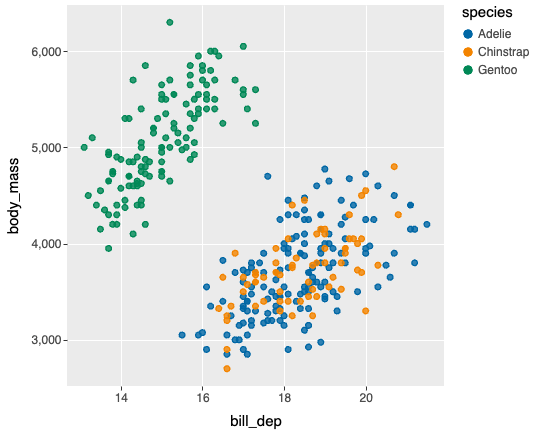
Code
code/demos/app-90-querychat.py
from shiny.express import render, ui
from querychat.express import QueryChat
from querychat.data import titanic


# 1. Provide data source to QueryChat
qc = QueryChat(titanic(), "titanic", client="github/gpt-4.1")

# 2. Add sidebar chat control
qc.sidebar()

# 3. Add a card with reactive title and data frame
with ui.card():
    with ui.card_header():
        @render.text
        def title():
            return qc.title() or "Titanic Dataset"

    @render.text
    def query():
        return qc.sql()

    @render.data_frame
    def data_table():
        return qc.df()