Introduction to Shiny Modules
Slide Contents
title: “Introduction to Shiny Modules”
Apps grow into tangled graphs
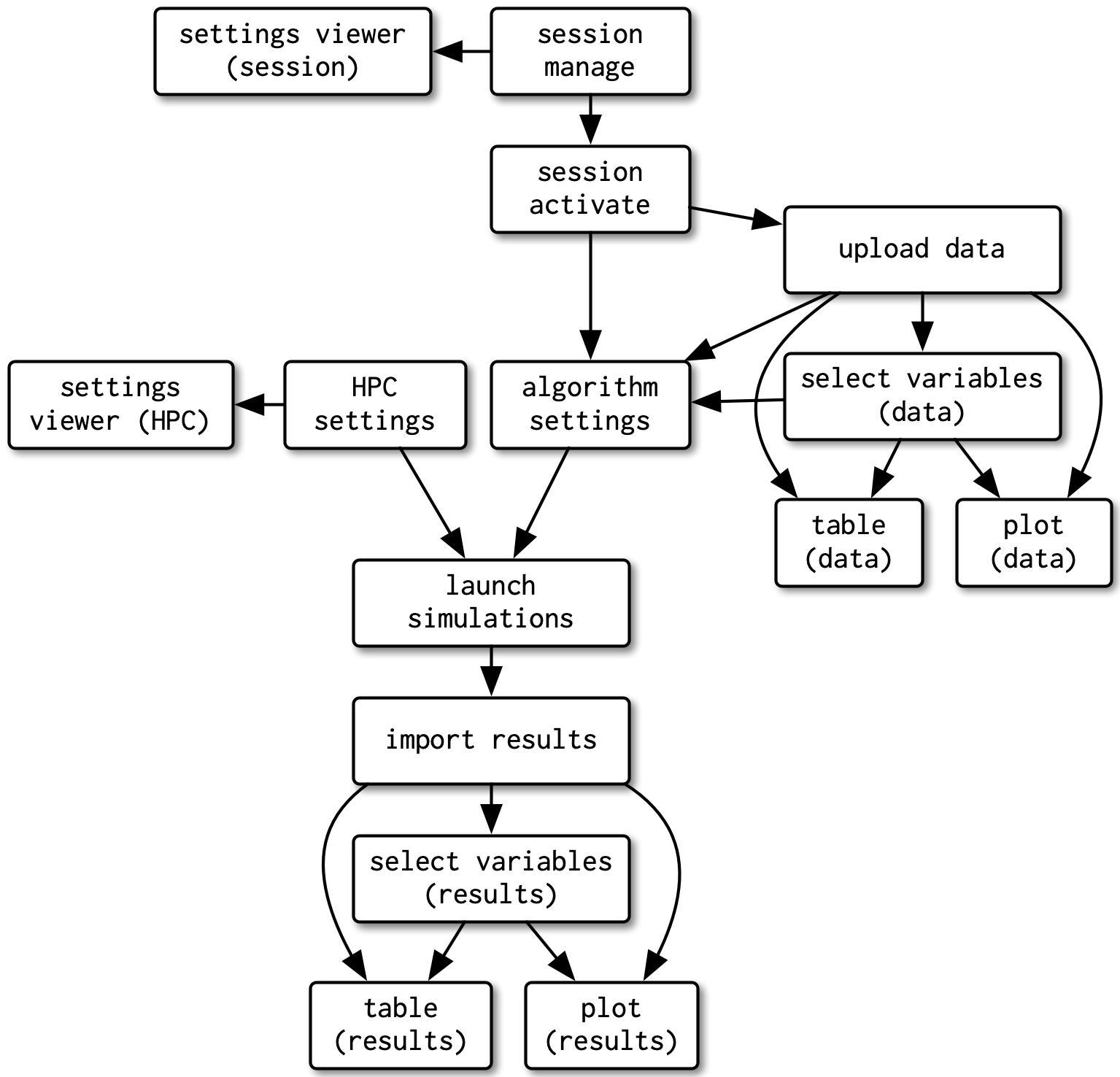
Source: Mastering Shiny, ch. 19
Group the pieces that belong together
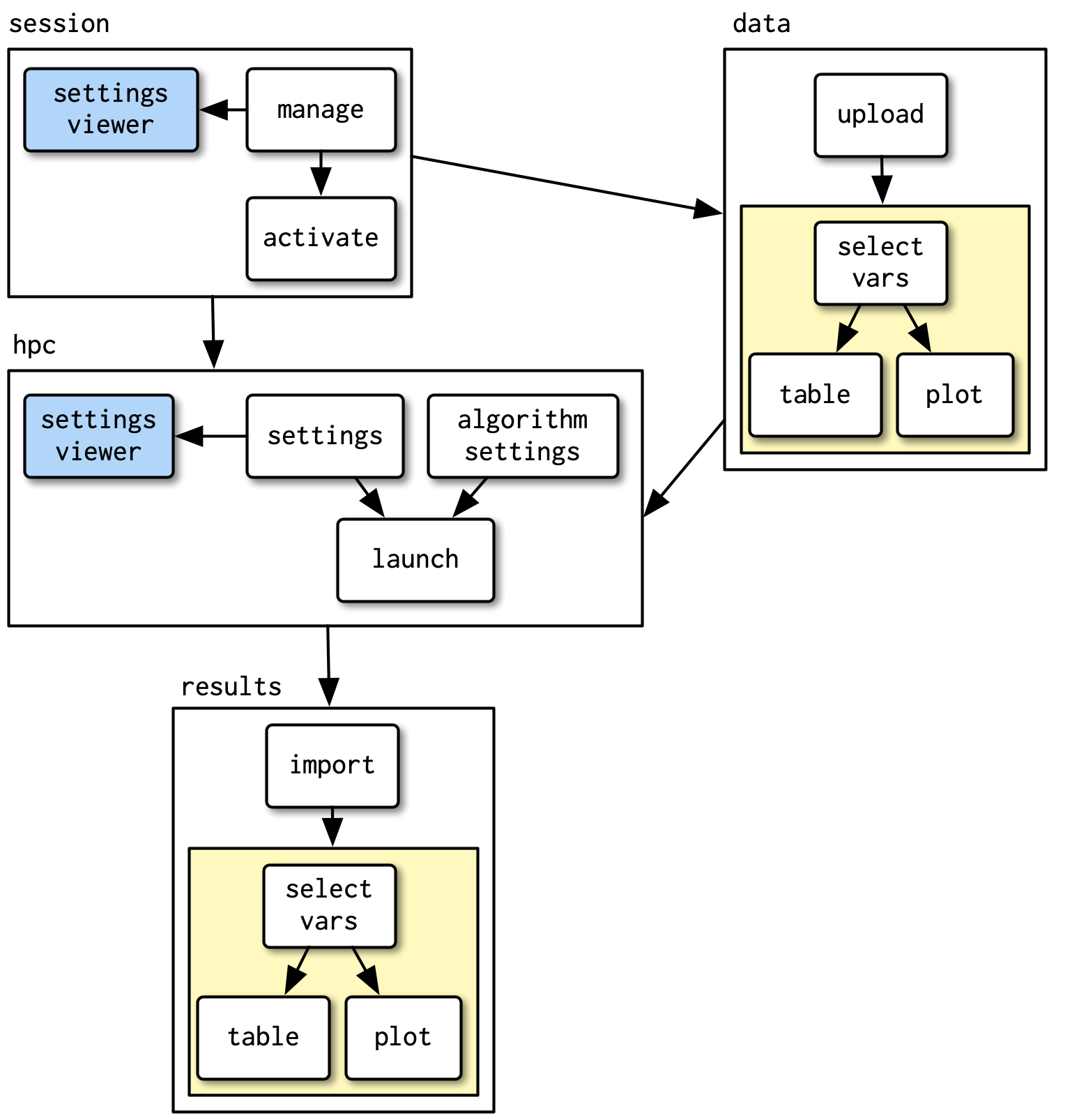
What changed
- Related boxes get grouped into a named unit (
session,data,results, …) - The same shape (yellow) shows up twice: written once, used twice
- The pitch for modules: isolate pieces so you can reason about them alone, reuse pieces so you don’t rewrite them
A module is just a function
- Abstraction is why we write functions at all: hide the details, expose a small interface, reuse the logic without re-deriving it
- A plain function already gives you that
So why isn’t it enough here?
The same problem, at our scale
- Your tips dashboard’s sidebar: a slider, a checkbox group, and a
@reactive.calcthat filters the data - Imagine a second dataset with its own filters: copy-paste the sidebar code, copy-paste the filter logic
- Now there are two places to fix every bug and two places to add every new feature
Functions don’t fully solve this
- Remember: every input/output ID must be unique across the whole app
- Python’s function scoping gives two calls independent local variables for free
- But
"filter_total_bill"isn’t a variable: it’s a string shipped to the browser and tracked in Shiny’s session-wide input list, and Python’s scope has no jurisdiction over it - Call the function twice and you get two
input_slider()s both named"filter_total_bill": Shiny can’t tell them apart
Shiny modules
A module is a function that:
- Encapsulates UI and server logic together
- Gets its own namespace: an ID prefix Shiny manages for you, so duplicate inner IDs never collide
- Otherwise behaves like a normal Python function: takes arguments, returns values
Shiny Express: @module
- One function is both UI and server
- Modules have been supported in Express since Shiny 0.10.0
from shiny.express import module, render, ui

@module
def scatter_panel(input, output, session, data, x, y):
    ...
Call it like a normal function, plus an id: scatter_panel("bill_depth_mm_bill_length_mm", data=dat, x="bill_depth_mm", y="bill_length_mm").
Note
Shiny Core has the same idea, split into @module.ui / @module.server. We’ll stick to Express here.
Our scatter module
One scatterplot panel with its own “Points” vs “Density” toggle, built once and used once per pair of columns:
#| '!! shinylive warning !!': |
#|   shinylive does not work in self-contained HTML documents.
#|   Please set `embed-resources: false` in your metadata.
#| standalone: true
#| components: [editor, viewer]
#| layout: vertical
#| viewerHeight: 550

from itertools import combinations

from palmerpenguins import load_penguins
from plotnine import aes, geom_bin2d, geom_point, ggplot, theme_minimal
from shiny.express import module, render, ui

dat = load_penguins().dropna()
num_cols = dat.select_dtypes("float64").columns.tolist()


@module
def scatter_panel(input, output, session, data, x, y):
    ui.input_radio_buttons("view", None, choices=["Points", "Density"], inline=True)

    @render.plot
    def plot():
        p = ggplot(data, aes(x=x, y=y)) + theme_minimal()
        if input.view() == "Points":
            p = p + geom_point(aes(color="species"), alpha=0.6)
        else:
            p = p + geom_bin2d(bins=20)
        return p


ui.page_opts(title="Scatterplot combinations", fillable=True)

with ui.layout_columns(col_widths=6):
    for x, y in combinations(num_cols, 2):
        with ui.card():
            ui.card_header(f"{x} vs {y}")
            scatter_panel(f"{x}_{y}", data=dat, x=x, y=y)
- Each panel’s
viewid is namespaced by its ownf"{x}_{y}"instance id - Toggling one panel never touches any other
- Nothing here was hand-rolled to make that true
Recap
- A module is a function with its own namespace: call it in a loop, on a second dataset, anywhere, and its inner IDs never collide
x,y, anddataare just arguments, captured normally on each call- Same idea works from Shiny Core or Shiny Express
Modules are also how you build a Shiny extension
- A module is just a function, so it can move to its own file
- Once it’s in its own file, you can
importit into any app - Once you can import it, you can put it in a package
- Put it on PyPI and anyone can
pip installit and use your module - This is how packages like
shinywidgetsandshinychatare built: a module (or a few) packaged up for reuse across projects
Code
code/demos/app-06-modules_scatter_combos.py
#| '!! shinylive warning !!': |
#|   shinylive does not work in self-contained HTML documents.
#|   Please set `embed-resources: false` in your metadata.
#| standalone: true
#| components: [editor, viewer]
#| layout: vertical
#| viewerHeight: 550

from itertools import combinations

from palmerpenguins import load_penguins
from plotnine import aes, geom_bin2d, geom_point, ggplot, theme_minimal
from shiny.express import module, render, ui

dat = load_penguins().dropna()
num_cols = dat.select_dtypes("float64").columns.tolist()


@module
def scatter_panel(input, output, session, data, x, y):
    ui.input_radio_buttons("view", None, choices=["Points", "Density"], inline=True)

    @render.plot
    def plot():
        p = ggplot(data, aes(x=x, y=y)) + theme_minimal()
        if input.view() == "Points":
            p = p + geom_point(aes(color="species"), alpha=0.6)
        else:
            p = p + geom_bin2d(bins=20)
        return p


ui.page_opts(title="Scatterplot combinations", fillable=True)

with ui.layout_columns(col_widths=6):
    for x, y in combinations(num_cols, 2):
        with ui.card():
            ui.card_header(f"{x} vs {y}")
            scatter_panel(f"{x}_{y}", data=dat, x=x, y=y)