Introduction to Shiny
Slide Contents
title: “Basic Building Blocks”
What is a Shiny app?
Each Shiny app involves:
- A web page that users interact with
- A Python process that watches the page and responds to user events
The Python process runs your code and sends results back to the browser.
Components
Each Shiny app consists of:
- Input components: widgets the user can interact with (sliders, dropdowns, checkboxes, …)
- Output components: things Shiny renders and displays (plots, tables, text, …)
- Layout: how the components are laid out on the page (columns, sidebar, boxes, cards, …)
Example application
#| '!! shinylive warning !!': |
#|   shinylive does not work in self-contained HTML documents.
#|   Please set `embed-resources: false` in your metadata.
#| standalone: true
#| components: [viewer]
#| viewerHeight: 550

from palmerpenguins import load_penguins
from plotnine import aes, geom_point, ggplot, theme_minimal
from shiny.express import input, render, ui

dat = load_penguins().dropna()
num_cols = dat.select_dtypes("float64").columns.tolist()

ui.input_select("x", "", num_cols, selected="bill_depth_mm")
ui.input_select("y", "", num_cols, selected="body_mass_g")


@render.plot
def plot():
    return (ggplot(dat, aes(x=input.x(), y=input.y(), color="species")) +
        geom_point(alpha=0.7) +
        theme_minimal()
    )
Reactivity
- Rebuilds only the outputs that depend on the changed input
- No callbacks
- No manual refresh
- No cache management
Spreadsheet analogy
Think of a spreadsheet:
- Inputs = cells you type values into
- Outputs = formula cells
- Instructions = the formulas
- Change a value cell, and only its dependent formula cells recalculate
- Shiny works the same way
Other reactive tools
- Pluto Notebooks: https://plutojl.org//
- Marimo Notebooks: https://marimo.io/
Key features
- Easy enough for prototypes
- Efficient enough to handle complexity
- Scales from a quick script to a production-ready app
Why Shiny for Python?
Shiny lets you build reactive web apps without worrying about:
- cache
- state
- callbacks
- …or even HTML, CSS, and JavaScript
Shiny Express vs Shiny Core
Important
Shiny for Python has two syntaxes for writing the same apps. There is full feature parity between the 2 syntax modes.
- Shiny Express: simpler syntax (think Streamlit)
- Shiny Core: more explicit, closer to Shiny for R and Dash
Today we’ll use Shiny Express.
Running a Shiny app
shiny run app.pyOr in Positron / VS Code: click the Run App button in the editor toolbar.
Open URL:Port (e.g., http://127.0.0.1:8000) in your browser.
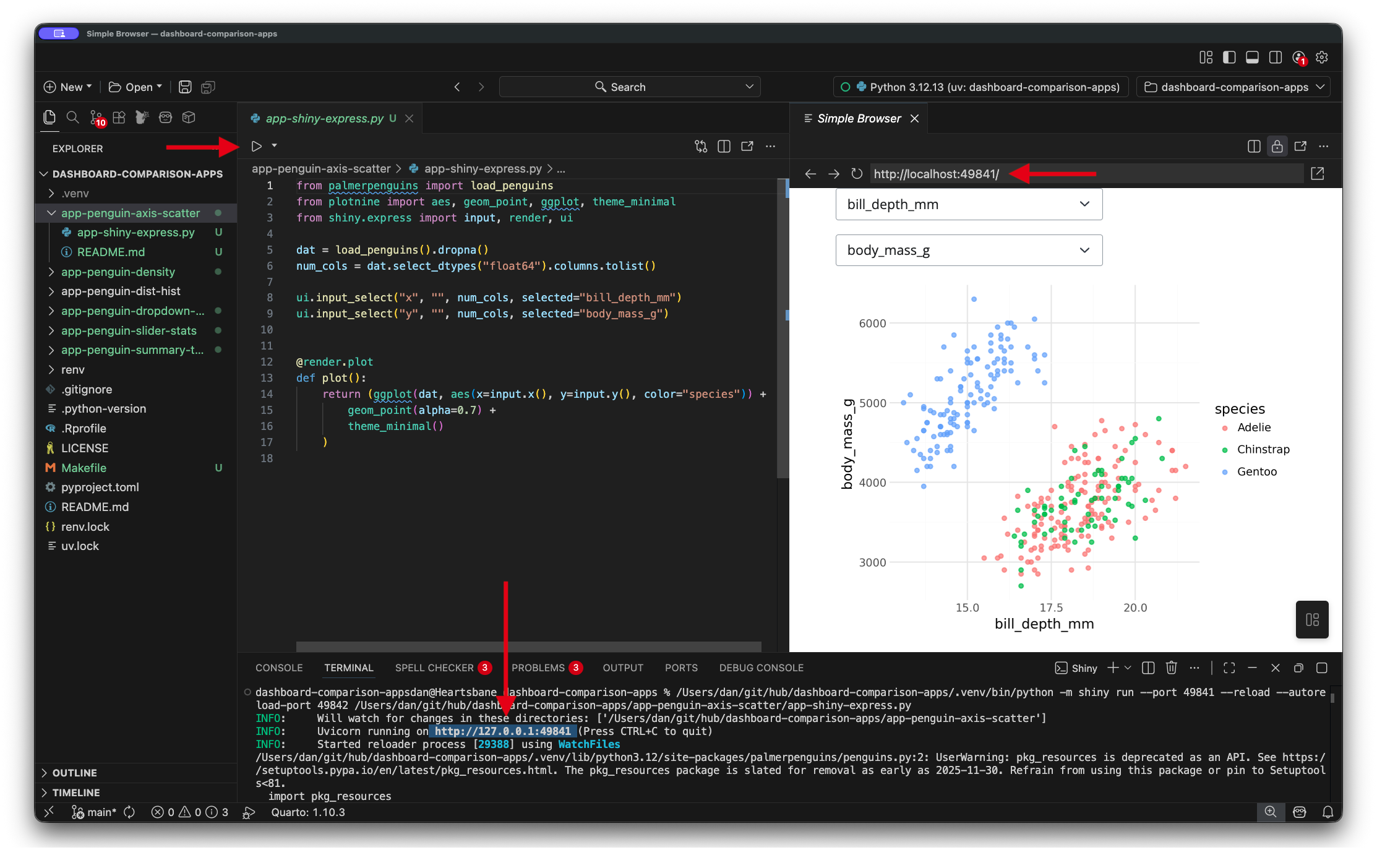
Code
code/demos/app-01-intro.py
#| '!! shinylive warning !!': |
#|   shinylive does not work in self-contained HTML documents.
#|   Please set `embed-resources: false` in your metadata.
#| standalone: true
#| components: [editor, viewer]
#| viewerHeight: 520

from palmerpenguins import load_penguins
from plotnine import aes, geom_point, ggplot, theme_minimal
from shiny.express import input, render, ui

dat = load_penguins().dropna()
num_cols = dat.select_dtypes("float64").columns.tolist()

ui.input_select("x", "", num_cols, selected="bill_depth_mm")
ui.input_select("y", "", num_cols, selected="body_mass_g")


@render.plot
def plot():
    return (ggplot(dat, aes(x=input.x(), y=input.y(), color="species")) +
        geom_point(alpha=0.7) +
        theme_minimal()
    )