{'lat': 40.7127281, 'lon': -74.0060152}Tool Calling
What is Tool Calling?
Allows LLMs to interact with other systems
Supported by most of the newest LLMs, but not all
Sounds complicated? Scary? It’s not too bad, actually…
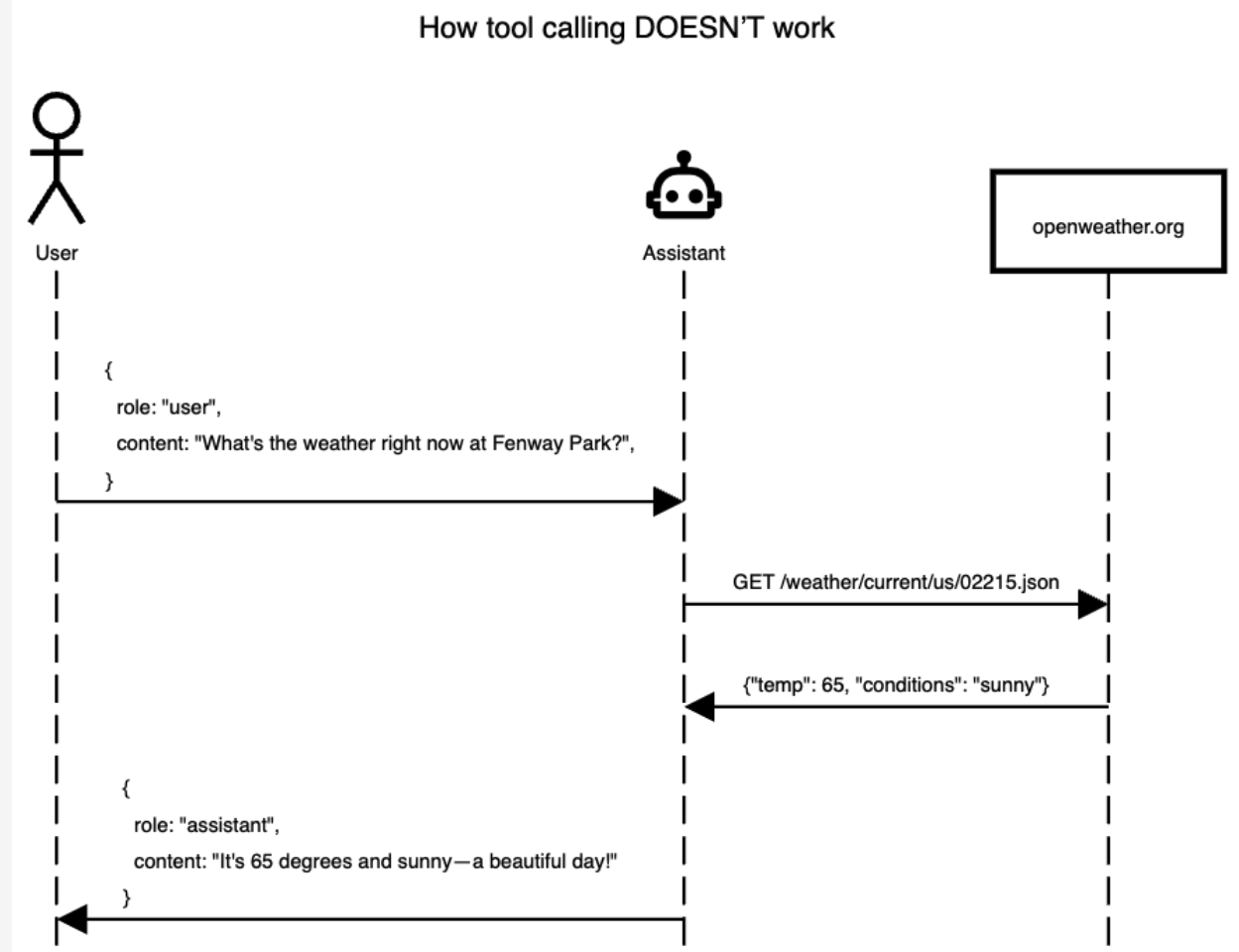
Reference: https://jcheng5.github.io/llm-quickstart/quickstart.html#/how-it-works
How it does NOT work
How it DOES work
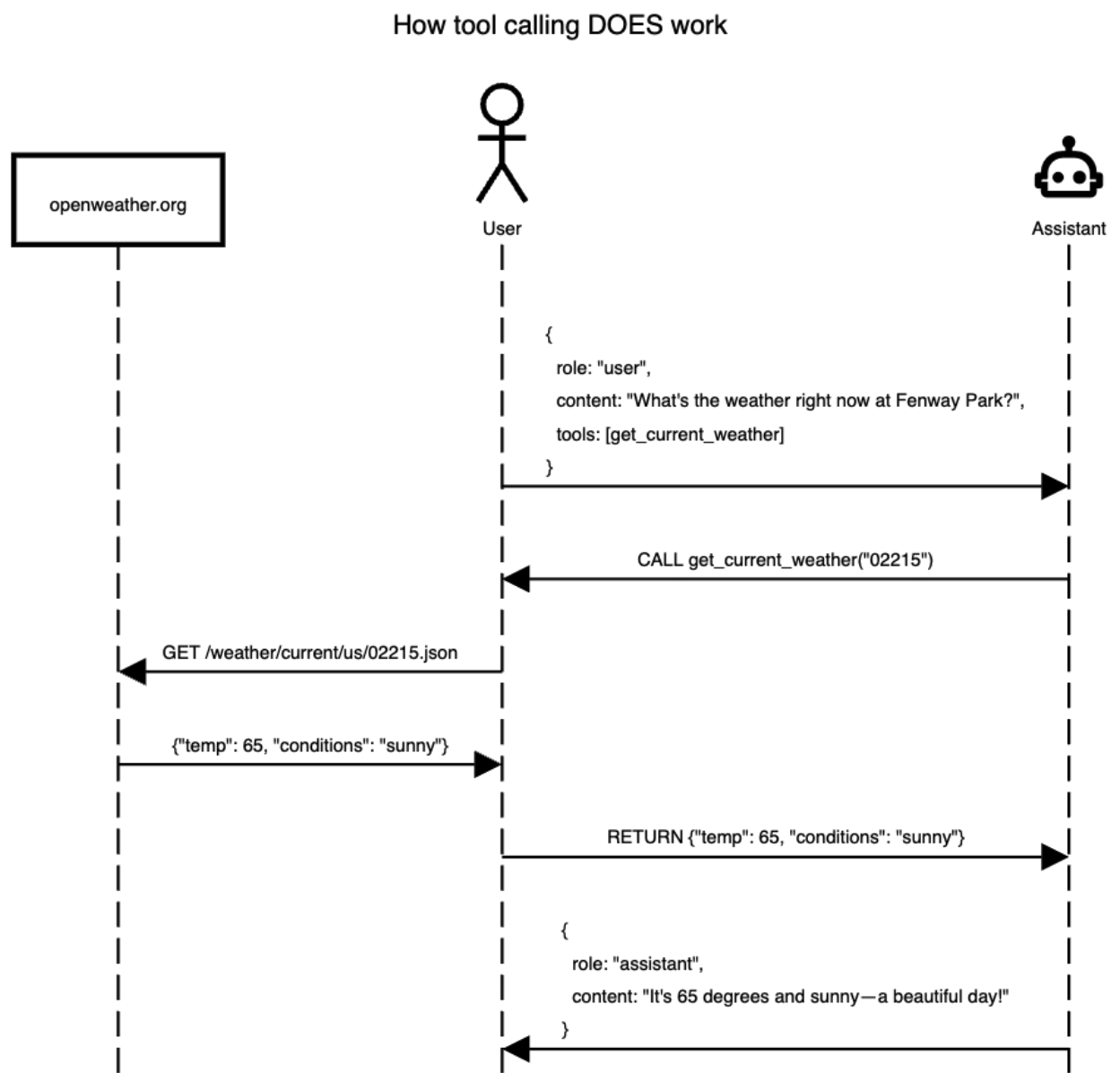
A tool is a function
- A tool call is a function that the LLM can use
- It can either infer what the function does by the function name, docstring, and/or parameter names
- You can also provide it the context you want
Example: Weather Tool
To ask the LLM about the weather in the current location we need to write a function that does a few things:
- Geocode a location to a latitude and longitude (this can also be an API)
- Use the latitude and longitude in an API that can look up the weather
Example Weather tool - Geocode
Example Weather tool - Geocode
Example Weather tool - Weather
Example Weather tool - Weather
{'latitude': 40.710335,
 'longitude': -73.99309,
 'generationtime_ms': 0.06771087646484375,
 'utc_offset_seconds': 0,
 'timezone': 'GMT',
 'timezone_abbreviation': 'GMT',
 'elevation': 32.0,
 'current_weather_units': {'time': 'iso8601',
  'interval': 'seconds',
  'temperature': '°C',
  'windspeed': 'km/h',
  'winddirection': '°',
  'is_day': '',
  'weathercode': 'wmo code'},
 'current_weather': {'time': '2025-08-26T17:30',
  'interval': 900,
  'temperature': 25.5,
  'windspeed': 14.4,
  'winddirection': 193,
  'is_day': 1,
  'weathercode': 0}}
Example Weather tool - Register
Demo: Weather R
library(httr)
library(ellmer)
library(dotenv)

# Load environment variables
load_dot_env()

# Define weather function
get_weather <- function(latitude, longitude) {
  base_url <- "https://api.open-meteo.com/v1/forecast"

  tryCatch(
    {
      response <- GET(
        base_url,
        query = list(
          latitude = latitude,
          longitude = longitude,
          current = "temperature_2m,wind_speed_10m,relative_humidity_2m"
        )
      )
      rawToChar(response$content)
    },
    error = function(e) {
      paste("Error fetching weather data:", e$message)
    }
  )
}

# Create chat instance
chat <- chat_openai(
  model = "gpt-4.1",
  system_prompt = "You are a helpful assistant that can check the weather. Report results in imperial units."
)

# Register the weather tool
#
# Created using `ellmer::create_tool_def(get_weather)`
chat$register_tool(tool(
  get_weather,
  "Fetches weather information for a specified location given by latitude and
longitude.",
  latitude = type_number(
    "The latitude of the location for which weather information is requested."
  ),
  longitude = type_number(
    "The longitude of the location for which weather information is requested."
  )
))

# Test the chat
chat$chat("What is the weather in Seattle?")
Demo: Weather Python
import requests
from chatlas import ChatAnthropic
from dotenv import load_dotenv

load_dotenv()  # Loads OPENAI_API_KEY from the .env file


# Define a simple tool for getting the current weather
def get_weather(latitude: float, longitude: float):
    """
    Get the current weather for a location using latitude and longitude.
    """
    base_url = "https://api.open-meteo.com/v1/forecast"
    params = {
        "latitude": latitude,
        "longitude": longitude,
        "current": "temperature_2m,wind_speed_10m,relative_humidity_2m",
    }

    try:
        response = requests.get(base_url, params=params)
        response.raise_for_status()  # Raise an exception for bad status codes
        return response.text
    except requests.RequestException as e:
        return f"Error fetching weather data: {str(e)}"


chat = ChatAnthropic(
    model="claude-3-5-sonnet-latest",
    system_prompt=(
        "You are a helpful assistant that can check the weather. "
        "Report results in imperial units."
    ),
)

chat.register_tool(get_weather)
chat.chat("What is the weather in Seattle?")
Demo: Shiny Application
from chatlas import ChatAnthropic
from shiny.express import ui

from helper.get_coordinates import get_coordinates
from helper.get_weather import get_weather

chat_client = ChatAnthropic()

chat_client.register_tool(get_coordinates)
chat_client.register_tool(get_weather)

chat = ui.Chat(id="chat")
chat.ui(
    messages=[
        "Hello! I am a weather bot! Where would you like to get the weather form?"
    ]
)


@chat.on_user_submit
async def _(user_input: str):
    response = await chat_client.stream_async(user_input, content="all")
    await chat.append_message_stream(response)
You try: register a tool
Asking for permission (CLI only)
- When you want to explicitly pause and have user input to make a tool call.
The New York Data Science & AI Conference. 2025. https://github.com/chendaniely/nydsaic2025-llm